
TCP/IP Tutorial and Data Logger Software
Understanding TCP/IP for data acquisition over Ethernet and Internet | Connecting an Instrument Directly to a Computer | Connecting via a Wider Network | Trouble-Shooting | Further Reading
Understanding TCP/IP for data acquisition over Ethernet and Internet
TCP/IP is a standard method for sending messages across a network. It is used on many networks including the Internet. You do not need to be a network expert to use it but some key facts will make it more understandable.
IP Address
Each computer on the network has an IP Address. This is actually a 32 bit binary number. Since such numbers are not user friendly they are usually presented in Dotted Decimal Notation. This splits the 32 bits into four 8-bit chunks. Each chunk is then converted to a decimal number in the range 0 to 255. For example 01011001 00011101 11001100 00011000 becomes 89.29.204.24
You can think of this address as being roughly like a postal address arranged as Country / City / Street / House Number.
Static or Fixed IP Addresses
An instrument may have a fixed IP Address which is allocated to it by a Network Administrator. The allocated address will be unique for the network. Your instrument will have a utility supplied by the manufacturer which will allow you to set the address.
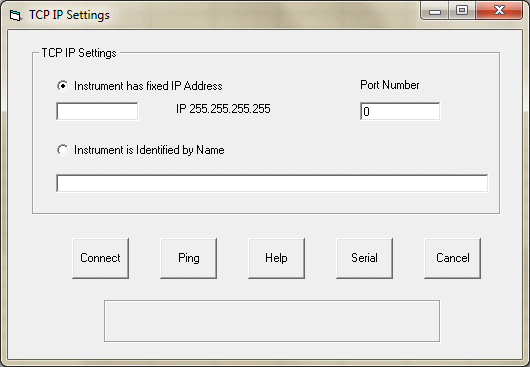
Configuring the free Windmill ComDebug software to log from a TCP/IP device
Dynamic IP Addressees
Alternatively an instrument may be allocated its IP Address when it powers up. This uses a process called Dynamic Host Configuration Protocol (DHCP). In this system the unit is identified by a name eg "My Instrument". When it powers up it asks a DHCP server to allocate an IP Address to "My Instrument". As the user, you need only decide to address the instrument by its IP Address or by its Name: the rest is done for you by the operating system.
Port Number
TCP/IP messages are sent not just to an IP Address but also to a Port Number within that address. This allows the message to be directed to one of potentially many applications running on the computer or instrument. Some port numbers are allocated to functions which all devices will support whilst others are for more general use. Your Instrument documentation must tell you which port to contact.
Subnets
Large networks are physically divided into subnets. Two devices which are on the same subnet can send messages directly to each other without the messages being seen by the rest of the network. This reduces traffic in the wider network.
The subnet is defined by the Subnet Mask. You can view this via Control Panel and the TCP/IP properties of your computer. This is another dotted decimal arrangement. For 2 units to be on the same subnet the parts of their IP Addresses which are covered by a binary 1 in the Mask must be the same. So if the Mask is 255.255.255.0 then the first 3 elements of both IP Addresses must be the same to be on the same subnet. (255 is the decimal equivalent to binary 11111111.)
If a unit whose IP Address puts it onto one subnet is physically plugged into another subnet then you will not be able to talk to it as your messages will be sent to the wrong subnet.
Gateways
When your computer wishes to send a message to a device on another subnet it sends the message via a Gateway. This is another computer which relays the message to the destination address. Your computer needs to know the IP Address of the Gateway. You can view this in the TCP/IP properties of your computer.
Name Servers
When your computer wishes to send a message to a named destination then it asks a Name Server to resolve the name to an IP Address. Your computer needs to know the IP Address of the Name Server. You can view this in the TCP/IP properties of the computer.
Ping Utility
This is a test utility which sends a message to a defined port within your instrument. The instrument replies with a short data message. Virtually every unit on TCP/IP will support this action. If you cannot Ping your instrument you will not be able to talk to it.
Connecting a TCP/IP Instrument Directly to the Computer
It is a good idea when first connecting instruments to keep things as simple as possible. A direct connection between Instrument and computer with no wider network connection seems sensible but it has some pitfalls.
- To connect your computer Ethernet port directly to the Instrument requires a special twisted cable. The cable used to connect your computer to a network hub will not work.
- If your computer uses a Dynamic IP Address then it cannot get an IP Address unless connected to a DHCP server. So in this arrangement it will not work.
- If the instrument uses a Dynamic IP Address it will not work unless your computer is configured as a DHCP server. Your computer will also need to perform the Name Server function to deal with such an instrument.
- Both computer and instrument will need to be on the same Subnet.
A direct connection is only easy if both computer and instrument use fixed IP Addresses on the same subnet and you have the correct cable.
Connecting via a Wider Network
Using the wider network provides the servers needed for DHCP and Names. Once a Dynamic IP Address instrument is plugged into the network then it should be possible to find it via its Name and the Ping utility. If it is a fixed IP Address and it is plugged into the correct subnet it should again be possible to Ping it.
Trouble Shooting TCP/IP Connections
- I can Ping my Instrument but I can't Connect to it
If you are sure that you are Pinging your instrument and not some other unit then it is likely to be because the port number is incorrect. You cannot connect to a port number which your instrument does not support. - I cannot Ping my Fixed IP Address instrument
Obviously you must enter the correct IP Address. The Instrument must be physically plugged into the correct subnet to match its IP Address. - I cannot resolve the Name of my Instrument to an
IP Address
Ping the IP Address of the Name Server to check that it is on line. Ask your Network Administrator to check that your instrument is being registered with the name server.

