
Windmill 7 Software
Windmill 7 is included in all our hardware systems
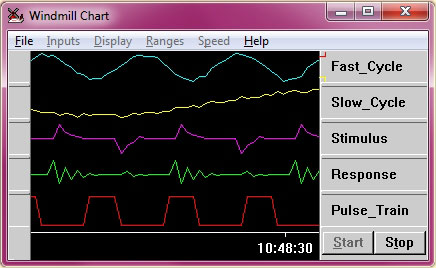
Charting Data with Windmill 7
ComDebug Serial Port Software
- Data logging from one instrument connected to the PC's COM port over RS232, RS422, RS485, Modbus or TCP/IP.
- Data saved in text files which can later be imported into Excel or other software.
- Handles ASCII, binary and hexadecimal data.
- COM port trouble-shooting:
- Control the state of the PC's serial port output lines;
- See the state of the serial port input lines;
- Quickly identify and correct communication errors;
- See all bytes sent and received, even non-printing characters like carriage returns;
- Send ASCII values, twos complement integers, 4-byte integers, double-words, unsigned integers, single bits, floating point, CRCs etc.
"Outstanding little tool! Best freebie I've ever seen! No problems, it worked perfectly."
J Franks, Industrial Control Engineer
Windmill 7 Data Acquisition and Control Software
- Data logging with the Windmill Logger program.
- Trend charting with the Windmill Chart program.
- Data display and DDE server with the Windmill DDE Panel program.
- Output control with the AnalogOut and DigitalOut programs.
- Connect up to 10 RS232, RS422, RS485, Modbus and TCP/IP networks and cables with the COMIML driver. (So you might have up to 10 RS232 devices, 100 RS422, 320 RS485 or many Modbus and TCP/IP devices.) Also works with the Microlink USB, Ethernet and Internet data acquisition hardware units.
- Data saved in text files and can be sent in real-time to other programs like Excel.
- Runs under Windows 10, 8, 7 (64- and 32-bit), Vista, XP, 2000, 98 and 95.
"Excellent software...very helpful"
Ridho
Data Logging Options
- Log only when new data is available from your instrument: when a weight changes on a balance for instance. Even if two items weigh the same, Windmill knows that a change has occurred, so no readings are missed.
- Log to a new data file at regular intervals, every hour or every week for example. This is useful in continuous, long-term logging.
- Log data only when channels are in an alarm state, for example when a temperature reading rises above a set point for five minutes. The temperature is regularly logged throughout this time.
- Log data for a fixed duration, for example during an alarm condition and for ten minutes afterwards.
- Use Excel to start and stop logging.
- Log from different channels at different rates.
- Log from different channels to the same or different files.
- Log data from RS232 instruments alongside Modbus and Ethernet devices.
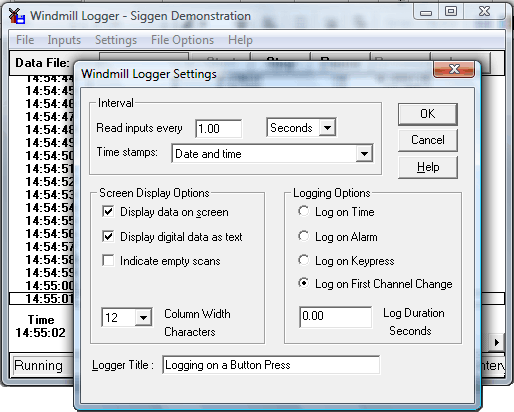
Setting the Logging Options
Comments
Subscribe to Monitor for Data Acquisition Tips
Monitor is a monthly newsletter with articles on data acquisition and control.
"I enjoy receiving the newsletter. It is the most practical of all the information I receive. The wide variety of uses provides inspiration for solutions to our requirements."
Shane Dunn, Systems Analyst
"I just wanted to drop you a short note to say thanks for producing your email newsletter. I thoroughly enjoy each one.
Besides being interesting they are very informative - especially the
continuing series on RS232 communications. I've learned more about
RS232 communications from reading your newsletter articles than from
any other single source. Thanks again for the wonderful service that you provide."
Gary Adams, Obsidian Group Inc.
"I'm always writing macros in Excel, and 'Monitor' is full of little ideas to assist me. The scrolling charts idea has saved me hours of work. I can now review a dataset in 5 mins, it used to take me a whole day. I find all of the Excel tips very useful."
Antony Boyle, Mechanical Engineering Consultant

